
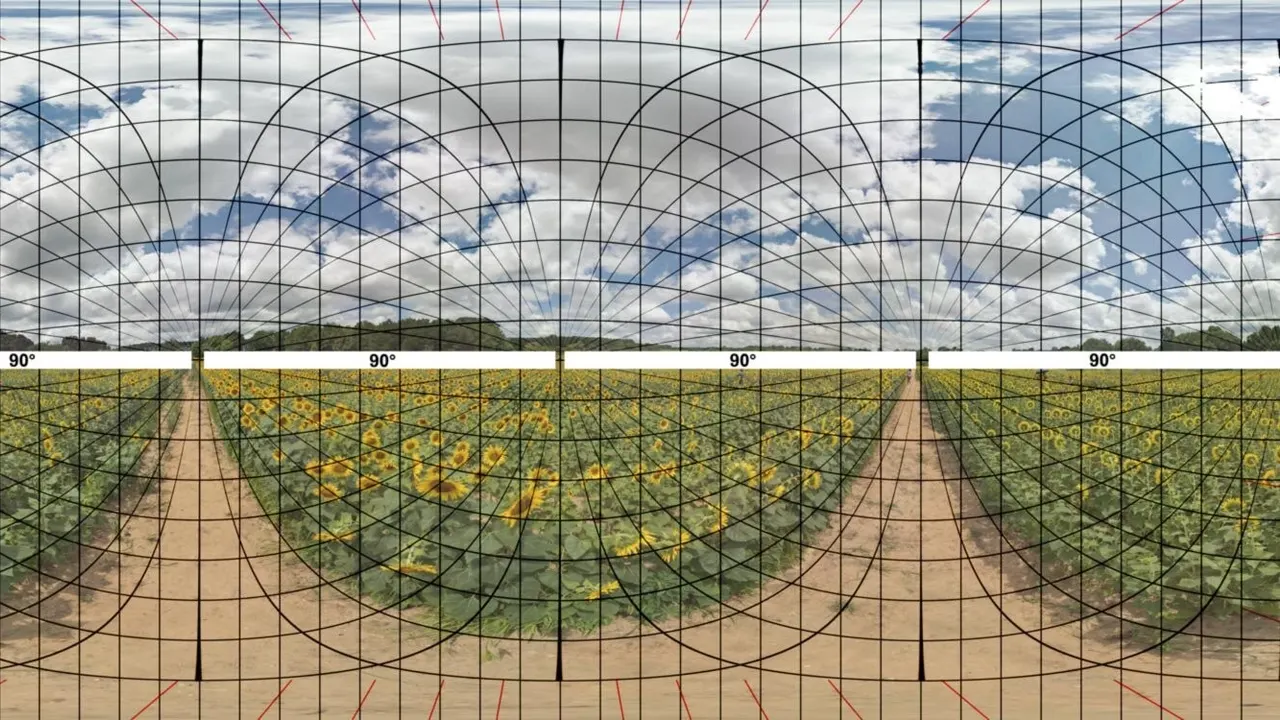
Almost every complaint about VR video quality comes down to a mismatch between four properties of the file and what the player and headset do with them. The resolution decides how much detail there is. The projection decides how the flat frame is wrapped around you. The stereo layout decides which half of the frame goes to which eye. The codec decides whether your hardware can unpack it at all.
In short
- Projection: 180 degrees is the standard for adult VR; 360 exists and is rarer; fisheye is a lens-specific variant that needs the right setting.
- Stereo: side by side is the usual layout, over-under exists, and getting it wrong is what makes your eyes fight.
- Resolution: 8K is the normal claim. Only two headset makers publish a decode ceiling at all.
- Codec: HEVC is what the studios ship. AV1 is newer and only Quest 3 and above support it on Meta's platform.
Projection: how the frame is wrapped around you
A VR video file is a rectangle, the same as any other video. What makes it VR is an instruction about how to wrap that rectangle around the viewer, and that instruction is the projection.
180 degrees wraps the frame across a half-sphere in front of you. It is the standard for adult VR for a simple reason: the camera is where the viewer is, there is nothing interesting behind the camera, and spending all the pixels on the half you actually look at doubles the effective resolution. Every platform we track states 180 support.
360 degrees wraps the frame around a full sphere. Eight of the seventeen platforms state it. The same pixel count has to cover twice the area, so a 360 scene at 8K looks softer than a 180 scene at 8K, which is why the format never took over in this niche.
Fisheye is not a different field of view so much as a different mapping. A fisheye lens compresses the edges and stretches the centre in a way that plain equirectangular playback gets wrong, so the player needs to know which lens was used. Studios encode that in the file name, and HereSphere publishes the profiles it recognises by name, including MKX200, MKX220, VRCA220 and RF52. DeoVR documents fisheye at 180, 190, 200 and 220 degrees with MKX correction, and Pigasus auto-detects the same tags.
Stereo: which half goes to which eye
Three-dimensional VR video contains two images, one per eye, packed into a single frame. Side by side puts them left and right; over-under puts them top and bottom. Sixteen of the seventeen platforms we track state 3D support, and side by side is the common arrangement.
Getting this wrong is the most uncomfortable mistake in VR video. If the halves are swapped, your eyes are each shown the other eye's view, depth inverts, and within a minute you will want to take the headset off. If the player treats a side-by-side frame as a single image, you see two people instead of one. Both are a setting, not a broken file.
Resolution, and what it is worth
Adult VR sells resolution harder than any other part of the video market. Twelve K appears on two platforms, 8K on ten, 7K on two. None of those figures is a measurement published next to a pixel dimension, with one exception: Czech VR Network prints 7680 x 3840 and the codec for every file.
What the number is worth depends on where those pixels go. A 180-degree scene at 7680 x 3840 spreads 7680 pixels across roughly 180 degrees, which is about 43 pixels per degree of source material. Your headset then shows it at its own pixels per degree, 25 on a Quest 3, 20 on a Quest 3S, 32 on a Bigscreen Beyond 2. Beyond the point where the source exceeds what the headset can show, extra resolution buys nothing except a larger file and a heavier decode.
The second limit is the decoder. Meta publishes 8192 x 4096 at 60 frames per second for 180 3D on the Quest 3, and Samsung publishes 7680 x 4320 at 60 for the Galaxy XR. Those are the only two published ceilings in this guide. For every other headset, a 12K claim has nothing to be checked against.
Codecs: whether the file opens at all
Three codecs matter here. H.264 is the old, universally supported one, used for lower tiers. HEVC, also called H.265, is what almost every studio ships at the top: it halves the file size at the same quality and needs hardware decoding, which every current headset has. AV1 is newer, more efficient again, and supported on Meta's platform only from Quest 3 upward, in Meta's own words.
Two practical traps. On Windows, HereSphere needs the Microsoft HEVC extension installed before H.265 will play at all, which produces a black screen that looks like a broken download. And ten-bit HEVC at 7K is a heavier decode than eight-bit HEVC at 8K, so the higher number is not always the harder file. Our HEVC page covers both.
Passthrough, the newest category
Passthrough scenes composite the performer into your own room using the headset's cameras rather than replacing your surroundings. Eight platforms state passthrough support, and the quality depends on the headset: the Quest 3 has a depth sensor the Quest 3S does not, and Apple Vision Pro's passthrough is the best in consumer hardware. This is the one format where the device matters more than the file.
Why the file name matters
Most players guess the projection and the stereo layout from tags in the file name. HereSphere publishes the whole convention in its FAQ, and DeoVR and Pigasus document their own detection. That is why a file called something_180_LR plays correctly and the same file renamed does not: nothing inside a plain MP4 tells the player it is a 180-degree side-by-side scene.
If a scene looks stretched, doubled or flat, start with the projection and stereo settings in your player before blaming the studio. Our wrong projection page walks through it.
How to read a studio's download tab
Most platforms give you a choice of files per scene, and the labels are inconsistent across the market. Here is what the parts usually mean, using the clearest example available, a Czech VR download tab.
- The resolution. 7680 x 3840 is the full frame, which for a side-by-side 180 scene means 3840 x 3840 per eye. A label that says only "8K" is describing that first number, rounded up.
- The codec. H.265 for the big files, H.264 for the smaller ones. If your headset or player struggles, the H.264 version of the same scene is the fix, not a lower resolution in the same codec.
- The projection and stereo tags. Usually in the file name: _180, _LR, _TB, _F180, _MKX200 and similar. Your player reads these, so renaming a file can break playback.
- The size. A rough proxy for bitrate when no bitrate is published, which is almost always. Two files at the same resolution and codec, one twice the size, are not the same quality.
What a format cannot fix
Bitrate is the missing number across this whole market. One platform publishes figures, SexBabesVR, which estimates roughly 40 Mbps at 4K, 80 at 6K and 120 and up at 8K for its streaming ladder. Everyone else gives you a resolution and a codec and leaves the thing that most affects how a scene looks unstated.
That is why two scenes both labelled 8K HEVC can look completely different, and why downloading usually beats streaming: a download is the file the studio made, while a stream is whatever your connection could sustain at that moment. If a scene looks soft in a browser and sharp as a download, nothing is broken.
What the studios publish
Across the seventeen platforms we track, 180 is stated by all of them, 360 by eight, 3D by sixteen, fisheye by three and passthrough by eight. Codec information is far rarer: only Czech VR Network publishes the exact encode of every file, and a handful of others name HEVC for their top tiers. Bitrates are published by exactly one platform, SexBabesVR.
Which player handles which format
Format support is where the eight players on this site genuinely differ, and the differences are not where people expect. All eight handle 180, 360 and 3D. Side by side is stated by seven, with Prism VR the exception, which is almost certainly an omission in its documentation rather than in the app.
Fisheye is the real divide: five players document it, three do not mention it at all. Codecs are worse. Three players name HEVC in a way we could verify, two name AV1, and two publish nothing about codecs whatsoever. Nobody publishes a decode ceiling, so every 8K claim on a player page is the developer's wording rather than a measurement.
The short version for choosing: if your scenes come from studios that shoot wide, take a player that names lens profiles. If your files sit on a network share, take one that speaks DLNA and SMB. Our players comparison sets all of it out field by field.
A note on frame rate
Resolution gets all the attention and frame rate gets almost none, which is odd given that movement is what breaks immersion. SexLikeReal advertises many scenes at 90 or 120 frames per second, which is the only platform-level frame-rate claim on this site. Meta's decode figures are stated at 60 frames per second, so a higher frame rate trades against resolution inside the same decoder budget.
In practice that means a 60 fps 8K file and a 120 fps 4K file can both be the right answer depending on the scene, and no studio except SexLikeReal gives you the choice.
How we record format claims
Everything on these pages is the vendor's own wording, taken from its own pages, with the date we read it. A banner saying 8K is recorded as a claim by the vendor, not as a measurement, and an unstated field stays unstated. That rule costs us some confident-looking tables and it is the reason our format pages disagree with most of the market.
What is the difference between 180 and 360 VR porn?
180 wraps the image across the half-sphere in front of you, 360 across a full sphere. At the same resolution 180 looks sharper, because the pixels cover half the area, which is why almost all adult VR is shot in 180.
Do I need 8K?
Only if your headset can show it. The source resolution stops helping once it exceeds what the headset displays, and only Meta and Samsung publish a decode ceiling at all.
Why does the picture look doubled?
The player is treating a side-by-side stereo frame as a single flat image. Change the stereo setting to side by side, or rename the file with the _LR tag your player expects.
HEVC or AV1?
HEVC, in practice: it is what the studios ship. AV1 is more efficient and supported on Meta's platform only from Quest 3 upward, and only two players here document it.